Gemini AI Photo Prompts: Copy-Paste Examples for Image Generation
Gemini AI prompts let you describe the exact scene you want—camera angle, lighting, wardrobe, mood—and Google’s multimodal model turns that text into a polished visual. Whether you need photorealistic portraits, fantasy concept art, product mockups, or ambient landscapes, this Gemini image prompt library gives you copy-paste starting points plus tips on how to remix them. Photographers, AI artists, marketers, and curious creators can use these ideas to accelerate AI photo generation and keep campaigns on brand.
Treat each prompt as a blueprint: copy it into Gemini, generate a set of images, then iterate by tweaking color palettes, props, or lens specs. When you’re ready for full prompt packs, explore the Portrait Prompt Collection, Landscape Prompt Collection, and Product Photography Prompt Collection. Need help refining? The AI Tutorials Hub walks through prompt-engineering workflows step by step.
What Are Gemini AI Photo Prompts?
Gemini AI photo prompts are text-to-image instructions that tell Google Gemini how to generate specific visuals. When you type a detailed description—including subject, style, lighting, camera settings, and mood—Gemini's image generation model interprets your words and creates photorealistic or stylized images matching your vision.
These prompts work as blueprints for AI image generation. You can use them for portraits, landscapes, product photography, fantasy art, and commercial campaigns. The key is providing enough detail: mention camera lenses (like "85mm f/1.8"), lighting conditions ("golden hour," "studio rim lighting"), and style modifiers ("hyperrealistic," "cinematic") so Gemini understands exactly what you want.
Whether you're creating content for social media, marketing materials, or creative projects, Gemini AI photo prompts give you a starting point. Copy the prompt, paste it into Gemini, and refine it by changing one element at a time until the output matches your brand or creative brief.
How to Write Effective Prompts for Gemini AI Image Generation
Writing effective prompts for Gemini AI image generation requires structure and specificity. Start with your subject (person, product, landscape), then layer in style details, lighting, camera settings, and mood. Gemini responds best to detailed descriptions that paint a complete picture.
Prompt Structure: A strong Gemini prompt follows this pattern: Subject + Style + Lighting + Camera + Quality. For example: "A confident creative director (subject) in a charcoal suit (style), soft window light wrapping around the face (lighting), Canon EOS R5 85mm f/1.8 look (camera), photorealistic 8K ultra HD (quality)."
Why Gemini responds well to detail: The model uses your text as a blueprint. When you mention specific camera lenses, lighting conditions, or artistic styles, Gemini can match those technical and aesthetic cues more accurately. Terms like "volumetric lighting," "shallow depth of field," or "cinematic composition" help the AI understand both technical photography concepts and visual mood.
To improve your Gemini prompts, include: camera specifications (lens focal length, aperture), lighting direction and quality (rim lighting, golden hour, studio softbox), style modifiers (photorealistic, hyperrealistic, cinematic), and resolution hints (4K, 8K). The more precise your prompt for Gemini AI, the closer the generated image will match your vision.
Gemini AI Photo Prompts with Image Examples
The examples below pair Gemini AI photo prompts with finished images so you can see how detailed text descriptions translate into visual results. Copy, paste, and adapt them to your own scenes, faces, or brands.
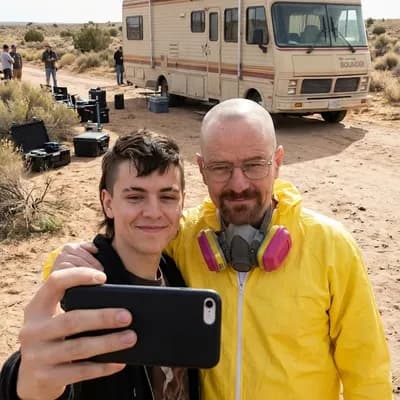
Breaking Bad Behind-the-Scenes Selfie
A photorealistic, behind-the-scenes style selfie that places you on the set of an iconic TV show — perfect for viral social posts.
Prompt (copy-paste):

Lionel Messi Stadium Selfie with Police Escort
A realistic wide-angle stadium selfie with a football legend and crowd energy, ideal for fan-style content and social proof visuals.
Prompt (copy-paste):
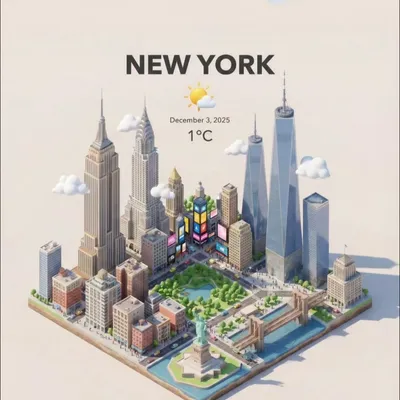
3D Isometric City with Live Weather Integration
A miniature 3D city visualization that blends real-time weather and AQI data with iconic landmarks for dashboards and hero illustrations.
Prompt (copy-paste):
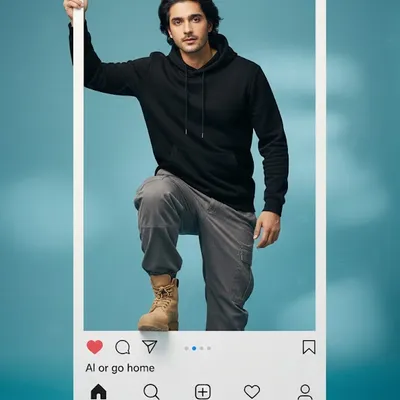
Ultra-Realistic Instagram Frame Portrait
A high-fashion portrait that “steps out” of an Instagram frame — perfect for social media profile art and promo graphics.
Prompt (copy-paste):
Trending Gemini AI Photo Prompts (2025–2026)
These trending Gemini prompts reflect current visual styles in AI image generation, from cinematic realism to product advertising and social media content.
Cinematic Realism Portrait
Product Hero Shot
Social Media Lifestyle
Atmospheric Landscape
Editorial Fashion
Minimalist Product Flat Lay
These trending Gemini prompts cover popular styles in 2025–2026: cinematic realism for portraits, minimalist product shots for ecommerce, lifestyle content for social media, and atmospheric landscapes for travel and editorial work.
Portrait & People Prompts
Use these Gemini AI prompts when you need photorealistic portraits, editorial looks, or stylized character concepts. Pair them with our Portrait Prompt Collection for even deeper shot lists.
Studio Headshot with Depth
Photorealistic • 8KGenerates a clean, agency-ready portrait that feels like it was shot in a NYC loft studio.
Usage tip: Swap the wardrobe color or camera lens (e.g., 50mm) to change perspective without losing the polished vibe.
Editorial Neon Portrait
Hyperrealistic • Cinematic lightingGreat for urban campaigns or music artwork because the lighting pops on every platform.
Usage tip: Add “wet pavement reflections” or “double exposure light leaks” when you need extra drama.
Soft Lifestyle Shot
Lifestyle • Film-inspiredIdeal for articles, newsletters, or wellbeing brands that need warmth and authenticity.
Usage tip: Mention specific props (coffee mug, plush toy) to tailor the story to your product.
Landscape & Environment Prompts
Craft cinematic backgrounds, travel hero images, and atmospheric environments. Need more? Visit our Landscape Prompt Collection.
Golden Hour Range
HDR • 8KProduces wallpaper-worthy vistas with balanced highlights and shadows.
Usage tip: Change the time of day (“blue hour” or “stormy twilight”) to instantly shift the mood without rewriting the whole prompt.
Foggy Forest Path
Cinematic • MoodyPerfect for meditation blogs or mystery book covers thanks to the atmospheric depth.
Usage tip: Add “negative prompt: people, animals” if you want an empty scene every time.
Fantasy & Concept Art Prompts
Bring dreamscapes and characters to life. When you need even more styles, cross-reference the AI Image Styles Library.
Celestial Guardian
Concept art • Volumetric lightCreates polished key art for fantasy campaigns or tabletop RPG decks.
Usage tip: Mention a color palette (cool blues, fiery oranges) to align with your brand world.
Surreal Pastel City
Stylized • 4KDelivers whimsical hero images that work for tech landing pages or album covers.
Usage tip: Add “isometric view” for UI backgrounds or “fish-eye lens” for dynamic posters.
Product & Commercial Prompts
Use these Gemini AI prompts for ecommerce, packaging decks, and paid ads. For comprehensive shot lists, check the Product Photography Prompt Collection.
Floating Tech Hero
Commercial • 4KMimics the floating product hero look used by top consumer tech brands.
Usage tip: Swap “soft gray gradient” for your brand’s color or “negative prompt: fingerprints, dust” to keep surfaces pristine.
Organic Cosmetics Flat Lay
Editorial • 8KGreat for social ads or pitch decks where you need an elevated but natural aesthetic.
Usage tip: Name the product type (serum, candle, perfume) so Gemini picks appropriate packaging.
Safety & Best Practices
- Avoid generating real people’s likeness without consent. Describe archetypes (“fashion stylist,” “pro gamer”) instead of naming individuals.
- Iterate safely: change one element—lighting, lens, or outfit—and note which versions your team approves. Store everything in the Tutorials Hub so you can revisit prompts later.
- Check outputs before publishing. If hands, text, or accessories look off, add negative prompts like “no extra fingers, remove warped objects.”
- Use disclosure labels (#AIgenerated) where platform guidelines require them, especially for ads or monetized pages.
- Need consistent lighting cues? Reference the AI Image Styles Library to copy proven lens and texture language.
Copy any prompt to try in Gemini
Or use these as seeds and build your own trend. Explore our full prompt libraries for even more inspiration.
Explore Prompt Libraries →FAQs
How do I use these Gemini AI prompts?
Copy the prompt, paste it into Gemini, and prepend “Generate an image of…” so the model switches to image mode. Iterate by changing one detail—lighting, props, or camera settings—until it matches your brief.
What is the best Gemini AI prompt for photo generation?
The best Gemini AI prompt for photo generation includes: a clear subject, specific camera settings (lens, aperture), lighting direction and quality, style modifiers (photorealistic, cinematic), and resolution hints (4K, 8K). For example: "A confident professional in a charcoal suit, soft window light, Canon EOS R5 85mm f/1.8 look, photorealistic 8K ultra HD." The more detail you provide, the better Gemini matches your vision.
Can I customize the prompts for clients or commercial work?
Absolutely. Treat each prompt as a creative scaffold. Swap in your product name, color palette, or campaign slogan, then log the final version inside the Tutorials Hub so teammates can reproduce it.
Are Gemini AI photo prompts free to use?
Yes, these Gemini AI photo prompts are free to use for personal and commercial projects. You can copy, modify, and adapt them for your campaigns, social media content, marketing materials, or creative work. There are no licensing fees or restrictions on using these prompts with Google Gemini for image generation.
What if the first render looks off?
Refine by clarifying the focal point (“focus on the hero product”), adding negative prompts (“no extra limbs, remove watermarks”), or adjusting quality modifiers like “hyperrealistic” or “volumetric lighting.”